Make Your Own Contactless Sign in for Your Business Today!
By simply using something like Google forms and then link the form to a QR Code, you can have a “Contactless Sign In Form” up and running in just a few minutes.
You can use our Free QR Code Generator to create a static QR Code. When at the QR Code Generator, scroll to the “URL” in the content dropdown and enter the “website link” of your form and Make Your Own Contactless Sign in.
For more secure and detailed information use a Dynamic QR Code and for added security and stats add a utm.
Your customers simply sign in by scanning the QR Code. You can have a tablet available for those that don’t have a phone with them. In the Google Forms, you can view and download them as a spreadsheet with just a click of a button if requested by contact tracing.
Benefits When You Make Your Own Contactless Sign in
We understand the importance of social distancing and reducing physical contact so we developed a genuinely contactless sign in system. Visitors, contractors and staff can now sign in and out without any physical contact.
Simply go to the app store for your particular mobile phone and download an app, Once loaded scan the QR code displayed on the terminal using the camera on a mobile device, and complete the contactless sign in online. If you have an older phone then use the Kaspersky app for any phone to scan QR Codes. Kaspersky is an anti virus company and will instantly check the scanned link is safe. Y
After you Make Your Own Contactless Sign in, Print your unique QR code or display it from a mobile device to allow visitors and contractors to sign in through the web portal. It’s a cost-effective contactless sign-in solution for improving traceability and the safety of your site.
The 9 best online form builder apps
- Google Forms for quickly creating powerful forms for free
- Microsoft Forms for collecting and analysing form results in Excel
- Typeform for conversational data collection
- Wufoo for quickly creating graphical reports without spreadsheets
- JotForm for creating templated forms
- Formstack for regulated businesses
- Paperform for creating forms that look like landing pages
- Formsite for protecting sensitive data
- Formbakery for hosting forms on your own server
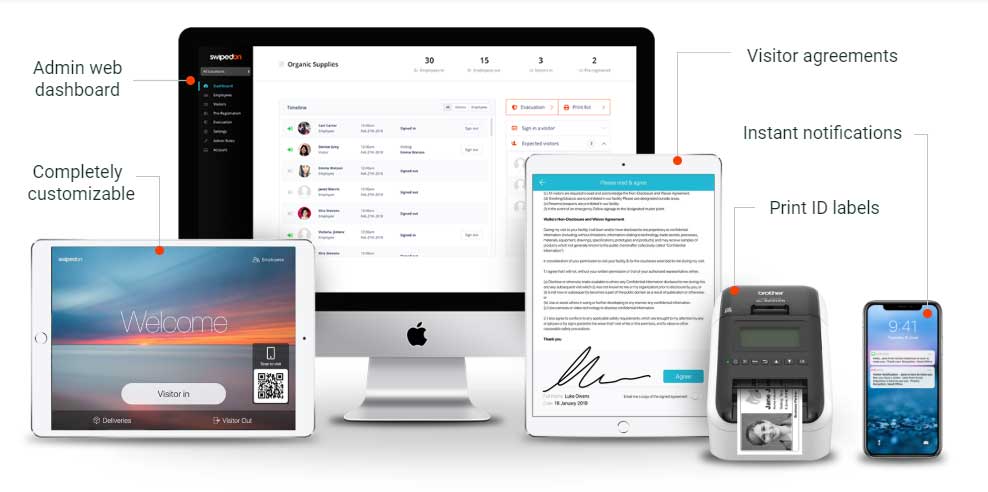
You can also purchase a complete contactless sign-in system through Swipedon.
Frequently Asked Questions: QR Codes for Contactless Sign-In Post-COVID
As businesses adapt to the “new normal” after COVID, contactless solutions have become essential. QR codes for contactless sign-in offer a safe, fast, and paper-free way to check people in—whether they’re staff, visitors, or customers. Here are the most common questions we hear.
1. Why are QR codes still relevant after COVID?
QR codes remain popular post-COVID because they provide a hygienic, touch-free way to access forms, menus, and sign-in systems. They’re quick to scan, easy to update, and cost-effective—ideal for businesses that want to continue prioritising health and safety.
2. How does a contactless QR code sign-in system work?
Users simply scan a QR code with their smartphone camera, which opens a web-based form. They can enter their details, sign a waiver, or complete a check-in—all without touching a kiosk or pen. It’s seamless and secure.
3. What industries are using Contactless Sign in with QR codes for check-ins?
In Australia, QR codes are widely used across:
-
Offices and corporate buildings
-
Healthcare clinics and aged care
-
Gyms and fitness studios
-
Construction sites and warehouses
-
Schools, unis, and childcare centres
4. Do I need a special app to use QR code sign-ins?
No special app is needed. Most smartphones have built-in QR code scanning through their camera. Once scanned, the link opens instantly in the browser. It’s that simple.
5. Can I create my own QR code sign-in system?
Yes! You can create a free static QR code that links to a Google Form or a sign-in page, or use platforms like SwipedOn for more advanced visitor management features. QR Codes Australia can help you get started.
6. Is data collected through QR code sign-ins secure?
Yes, as long as the platform you use is compliant with privacy regulations. We recommend using trusted tools that store data securely and allow you to control data retention periods.
7. Can QR codes help with contact tracing?
Definitely. While formal contact tracing requirements have eased, many businesses still keep basic check-in logs for safety and compliance. QR code sign-ins offer a digital trail that’s easier to manage than paper forms.
8. How do I display a QR code sign-in at my business?
Print the QR code and display it in high-traffic areas like entrances, reception desks, or waiting areas. Make sure it’s eye-level, clearly labelled, and includes a short call-to-action like “Scan here to sign in.”
9. Are QR code sign-ins better than tablets or kiosks?
For many small to medium businesses, yes. QR codes are more affordable, don’t require maintenance, and don’t carry hygiene risks. You won’t need to clean a shared device or worry about screen malfunctions.
10. Can I use QR code sign-ins for staff as well as visitors?
Absolutely. Many businesses use separate QR codes for staff and visitor check-ins, allowing for streamlined logging and different forms depending on the person scanning.